
FAQs
What models are eligible for this promotion?
To check the eligible models for this promotion of your claim, please click here.
Where do I find my indoor and outdoor model numbers and outdoor serial number?
Your outdoor model number and serial number can be obtained from the outdoor unit (usually located on the side or front of the outdoor unit). Please see the example below:
In this example:
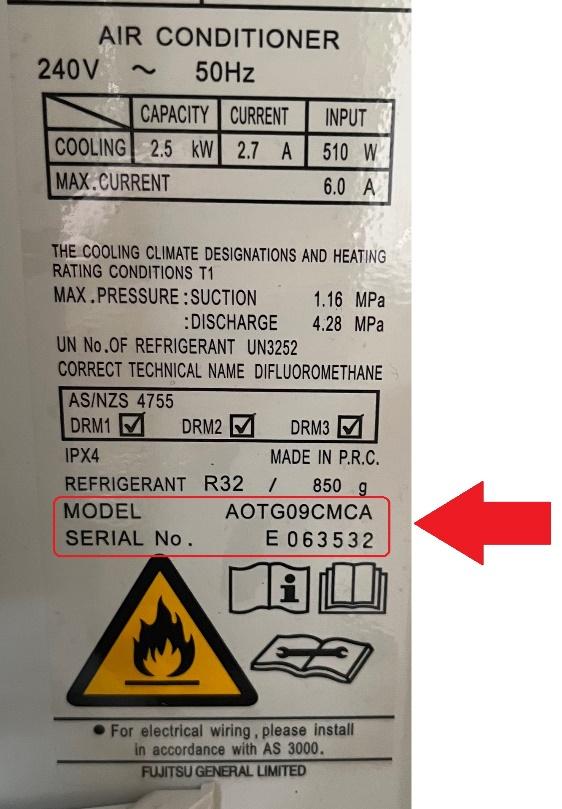
- Outdoor model number is: AOTG09CMCA
- Outdoor serial number is: E063532
Your serial number will start with E, R or T and is always followed by 6 digits.
Your indoor model number can be obtained from your tax invoice. If not, please contact your supplier.
If your outdoor serial number is inaccessible, you can find this information on the box the unit came in, otherwise please contact your installer who will have a record of this.
Note: Without entering the indoor and outdoor model numbers as well as the outdoor serial number, your claim cannot be processed. If you have purchased a unit and paid in full, but it is not yet in your possession, and therefore you are unable to provide the outdoor serial number in time to make a valid claim, please contact Fujitsu General Assist on 04 568 8761, to allow for alternate arrangements to be made.
How will I know my claim has been received?
Once we receive your claim, your Claim ID will appear online, and we will send you an automatic confirmation email. The next step of the process is to validate the details provided in your claim, please allow up to 4 weeks for this process to be completed. Once your claim is approved and processed, you will receive a second confirmation email. Alternatively, we will notify you if your claim has been rejected or if we require more information in order to validate your claim. Once you have lodged your claim, you are able to track the status here.
Should I claim using my installation address or postal address?
Please claim using your residential address.
Note: The Tax Invoice provided for your claim MUST show the residential address that the unit was installed at for a claim to be valid.
What if my receipt / tax invoice is in a business name?
Purchases in business names cannot be approved. Your receipt / tax invoice has to be in your full personal name to prove ownership of the Fujitsu heat pump / air conditioner. As stated in our terms and conditions, purchases must only be for domestic and residential use, and excludes non-residential applications.
What details need to appear on my tax invoice?
Copies of receipts / tax invoices are acceptable if they show a $0 balance, along with your full name, residential installation address, contact details, date and place of purchase and the Eligible Product model number of the heat pump(s) / air conditioner(s) purchased and paid for in full during the promotion purchase period.
Note: If you paid for your unit with cash, this must be clearly stated on the invoice. The unit must be paid for in full within the purchase period, with no outstanding balance.
What details need to appear on my proof of payment?
Proof of payment or transaction receipt (i.e., EFT receipt, bank statement, credit card slip) must clearly show full payment within the purchase period, i.e. amount paid equals the total amount charged for the unit being claimed on the invoice, as well as the claimant’s full name and the date of the payment.
Note: If you have purchased multiple units in different transactions you will need to include each individual transaction receipt.
How do I show that my invoice has been paid in full?
As per the terms and conditions, purchase is defined as fully paid for within the Promotional Purchase Period with zero balance owing. Receipts / tax invoices showing an amount outstanding will be rejected. You must provide a finalised merchant tax invoice, along with a valid proof of payment (2 separate documents).
What is the difference between my ‘tax invoice’ and ‘proof of payment’?
Your tax invoice is the branded store/business receipt you receive at the time of purchase.
Your proof of payment is your transaction record, e.g., bank statement, eftpos stub, cash receipt. You must provide both when you lodge your claim.
Why do I need to enter an email address?
You must have an email address to be able to complete the claim form. An email address is required to allow us to email you updates on the progress of your claim.
If you do not provide a valid email address that you are able to check regularly (including the junk folder, in case our emails have been incorrectly intercepted), you run the risk of missing out on important notifications regarding your claim.
Why do I need to enter my mobile number?
If your claim is marked ‘invalid’ and we do not hear back from you after sending an initial email requesting further information, we will then send you a follow-up SMS in relation to your invalid claim before the claim period closes, hence the reason we request your New Zealand mobile number.
I’ve opted to print and fax my claim form, along with my tax invoice and proof of payment, but my printer has failed! What now?
Don’t worry. Once you have fully completed the claim form online, a copy of the claim form will be emailed to you, enabling you to print once your printer is working again or you have found an alternate solution. Please visit our contact page if you require assistance.
If you are not sure if your claim has successfully been submitted, please get in touch with us via our contact page.
What is my Claim ID and what is it used for?
Your claim ID is a code unique to your claim. This ID will appear on the screen after lodging your claim. It will also be emailed to you to keep for your records. It can also be used to check the status of your claim during the claim period.
What do I do if I have lost or forgotten my Claim ID?
If you have lost or forgotten your claim ID, you can find it in the confirmation email that was sent to you after you lodged your claim. Please be sure to check your junk folder. Alternatively, you can enter the mobile number you used to submit your claim here to get your claim ID resent. If you are still unable to retrieve it, get in touch via our contact page.
Now that I’ve submitted a claim, how can I check on its progress?
To check on the status of your claim, please click here.
How can I provide additional documentation that has been requested as my claim is currently invalid?
If your claim is marked ‘invalid’, we will send you an email requesting further information, please either upload online via the unique link provided in this email, or reply to this email and attach your documentation.
How long will it take to receive my Fujitsu Black Friday 2025 Cashback via EFT?
If your claim is approved you will receive your EFT Cashback within 4 weeks.
Please allow up to 4 weeks for the initial claim validation and approval process.
How will my Fujitsu Black Friday EFT appear in my account?
The EFT reference will display in your nominated bank account as ‘FGNZ Black Friday’.
How many Fujitsu Black Friday 2025 Cashback EFTs will I receive?
You are entitled to receive one EFT per approved claim. However, if you have multiple approved product purchase claims under the same Claim ID, it is possible you may receive one EFT that has a balance of the accumulated value of all rewards you have received approval for, rather than separate EFTs for each.
What if I have a question that does not appear on the FAQs list?
Visit our contact page to get in touch with one of our friendly customer service representatives.